> ## Documentation Index
> Fetch the complete documentation index at: https://docs.rallied.ai/llms.txt
> Use this file to discover all available pages before exploring further.
# Rallied API
> Put your Rallied agent to work from your own scripts and automations: send it a prompt about any PSA ticket and act on the reply programmatically.
The Rallied API lets you talk to your agent about any PSA ticket from your own scripts, automations, and internal tools. Create a bearer token, `POST` a prompt with the ticket's integration slug and ID, and the agent replies with the same reasoning it uses in chat, respecting the client's Plan Mode and approval policies.
To use the API, you must be an MSP admin with a PSA connected under **Settings → Integrations**.
## Create an API token
Go to **Settings → API Tokens**.
Enter a name that identifies what will use it (for example, `PSA automation`), then click **Create token**.
The full token is shown once. Copy it into your secrets manager, then click **Done, I saved it**.
If you close the panel before copying, click **Revoke** next to the token, confirm, and create a new one.
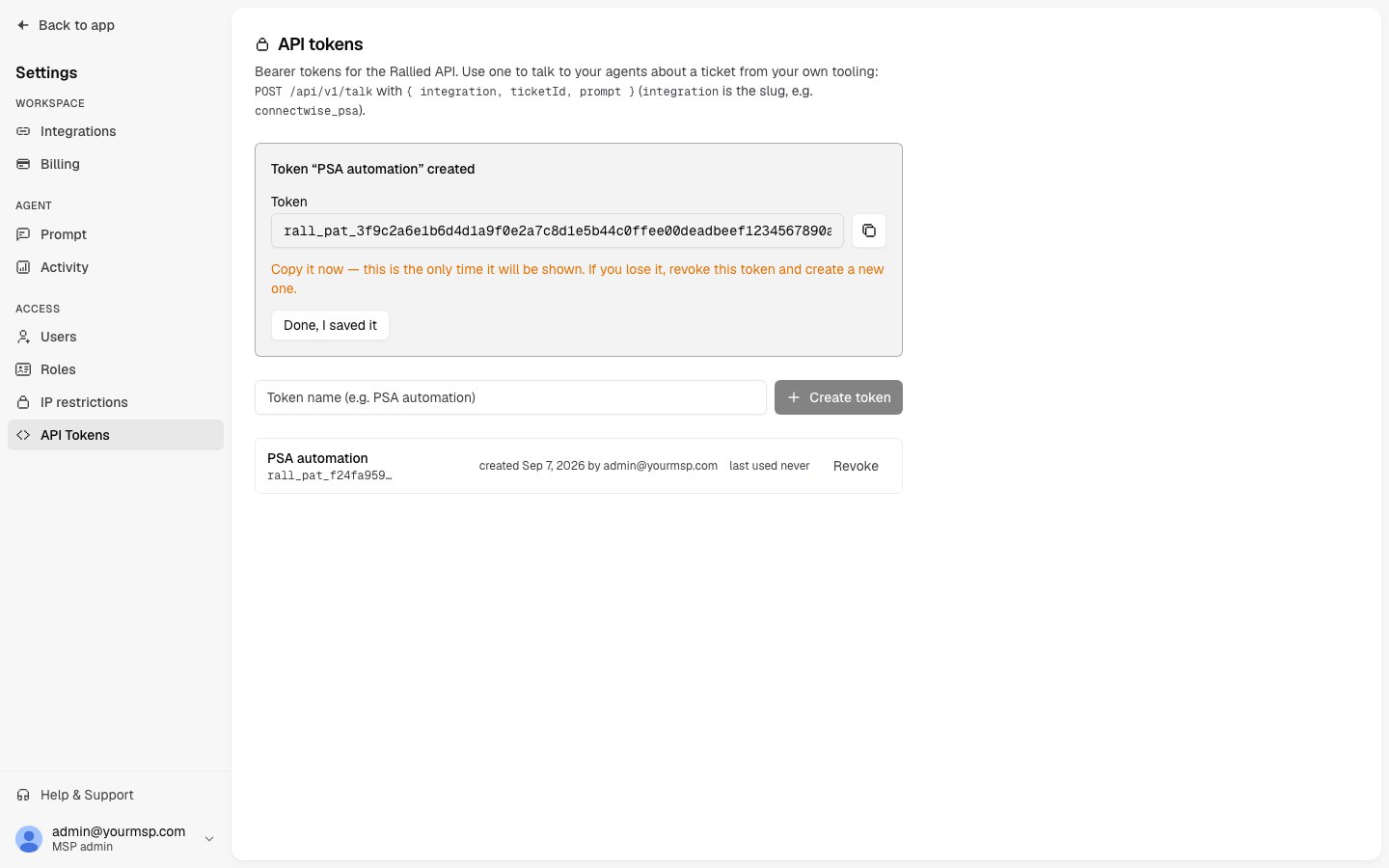 The token is displayed once. Rallied stores only a hash, so it cannot be shown to you again. If you lose it, revoke it and create a new one.
Tokens do not expire. Each token displays a **last used** time. Use it to spot tokens that are idle or, conversely, tokens that are still active when they shouldn't be.
Store tokens in a secrets manager or environment variable, never in source control or chat. Issue one token per calling system so you can revoke any single token without disrupting the others. Revoke immediately if a token is leaked.
## Revoke a token
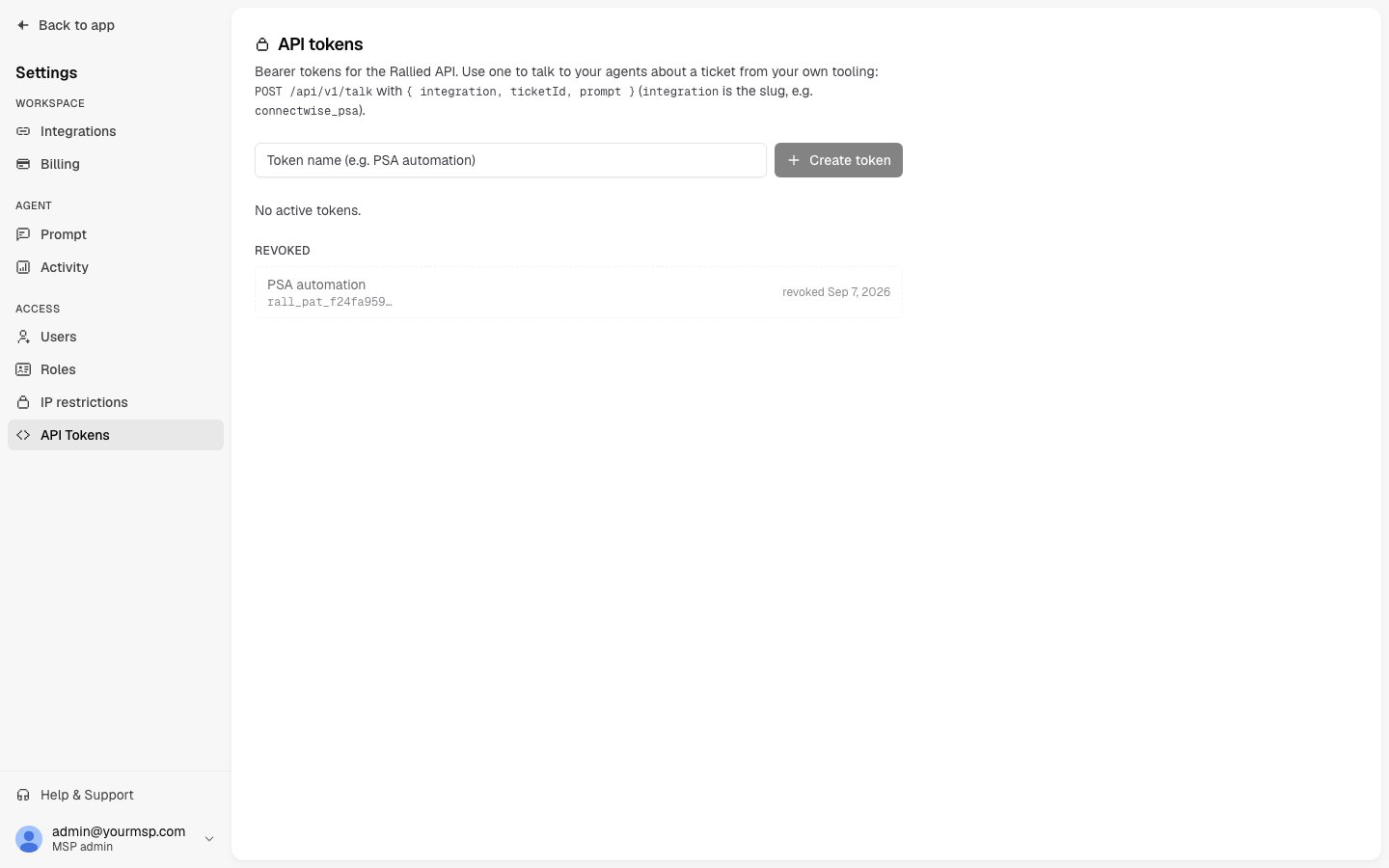
On **Settings → API Tokens**, click **Revoke** next to the token, then click **Confirm revoke**.
Subsequent calls with that token fail immediately with a 401. Revoked tokens remain in the **Revoked** list so you have a record of when each one was retired.
The token is displayed once. Rallied stores only a hash, so it cannot be shown to you again. If you lose it, revoke it and create a new one.
Tokens do not expire. Each token displays a **last used** time. Use it to spot tokens that are idle or, conversely, tokens that are still active when they shouldn't be.
Store tokens in a secrets manager or environment variable, never in source control or chat. Issue one token per calling system so you can revoke any single token without disrupting the others. Revoke immediately if a token is leaked.
## Revoke a token
On **Settings → API Tokens**, click **Revoke** next to the token, then click **Confirm revoke**.
Subsequent calls with that token fail immediately with a 401. Revoked tokens remain in the **Revoked** list so you have a record of when each one was retired.
 ## Talk to your agent about a ticket
```text theme={"system"}
POST https://api.rallied.ai/api/v1/talk
Authorization: Bearer rall_pat_
Content-Type: application/json
```
A single token can act on any client and any ticket in your MSP.
### Request body
Slug of the connected PSA that holds the ticket. Lowercase letters, digits, `_`, and `-`. Maximum 64 characters. See [Integration slugs](#integration-slugs).
The ticket number or ID in that PSA. Letters, digits, `.`, `_`, and `-`. Maximum 64 characters. The ticket must already exist in Rallied (see [How the conversation works](#how-the-conversation-works)).
What you want to ask or tell the agent. 1 to 20,000 characters.
### Integration slugs
| PSA | `integration` value |
| ------------------ | ------------------------ |
| ConnectWise Manage | `connectwise_psa` |
| HaloPSA | `halo_service_solutions` |
| Autotask | `autotask` |
| SuperOps | `superops` |
You can also copy the slug from the **API slug** chip on the integration detail page under **Settings → Integrations**.
### Example request
```bash theme={"system"}
curl -X POST https://api.rallied.ai/api/v1/talk \
-H "Authorization: Bearer $RALLIED_API_TOKEN" \
-H "Content-Type: application/json" \
-d '{
"integration": "connectwise_psa",
"ticketId": "48213",
"prompt": "Summarize what has happened on this ticket and what you would do next."
}'
```
### Example response
```json theme={"system"}
{
"reply": "The user reported they cannot open shared mailboxes since Monday. ...",
"thinking": "Optional. Present only when the agent shares its reasoning.",
"turnId": "3f9c2a6e-1b6d-4d1a-9f0e-2a7c8d1e5b44",
"sessionKey": "agent:contoso:connectwise_psa:48213:api",
"clientSlug": "contoso",
"mode": "execute",
"elapsedMs": 8421
}
```
The agent's answer to your prompt.
The agent's reasoning, when it shares it. Omitted when empty.
Unique ID for this request/response exchange.
Identifier for the conversation this exchange belongs to. Stable for a given integration and ticket, so follow-up calls continue the same conversation.
Slug of the client that owns the ticket.
`plan` when the client is in Plan Mode, `execute` when the client is in Execute Mode.
How long the agent took to answer, in milliseconds.
## How the conversation works
**Rallied must already know the ticket.** The API does not look tickets up in your PSA. It only sees tickets that arrived by webhook while the integration was enabled, for companies that are active clients. You'll get a 404 if the ticket predates the integration, the company isn't an active client, or the client is paused.
**Each ticket has its own API conversation.** Repeat calls for the same integration and ticket continue that conversation, so you can ask follow-up questions. This conversation is separate from the work the agent does on the ticket itself: your prompts don't change how the agent handles the ticket.
**The agent answers you, not the ticket.** It won't post to the ticket unless your prompt explicitly tells it to.
**Plan Mode and approval settings still apply.** In Plan Mode the agent only reads and plans. In Execute Mode, actions marked **Needs approval** wait for a technician, exactly as they do in [chat](/dashboard/chat).
**Calls block until the agent replies.** If the agent takes too long, you'll receive a 504 with the same `turnId` and `sessionKey`. The agent keeps working. Retry the same call to continue the conversation.
**Every exchange is logged in Activity** as an API chat on the ticket, so your team can see what you asked and how the agent responded.
## Errors and limits
Every error response is JSON with a single `error` string.
| Status | `error` | What to do |
| ------ | ------------------------------------------------------------------------------------------------------------------ | ---------------------------------------------------------------------------------------------------------------------------------------------- |
| 401 | `invalid or revoked token` | Check the `Authorization` header and the token. Rallied returns this same message for missing, malformed, unknown, and revoked tokens. |
| 404 | `integration not found` or `ticket not found` | The slug isn't a connected, enabled integration in your MSP, or Rallied has no record of the ticket. Rallied does not query the PSA to verify. |
| 405 | `Method not allowed` | Use `POST`. |
| 422 | `integration (slug [a-z0-9_-], max 64), ticketId ([A-Za-z0-9._-], max 64) and prompt (1-20000 chars) are required` | Fix the request body. The field is `integration`, not `integrationId`. |
| 429 | `Too many requests, slow down` | Back off until the time in the `Retry-After` header. |
| 502 | `agent did not accept the message` or `agent turn failed; please retry` | Wait briefly, then retry. |
| 503 | `agent runtime unavailable` | The agent for your MSP is starting or temporarily unavailable. Retry in about a minute. |
| 504 | `agent did not reply within the timeout; the turn may still complete` | The agent is still working. Send the same request again to continue. |
Rate limits are applied in two tiers:
* 600 requests per minute per IP address
* 30 requests per minute per token
Every response includes `RateLimit-Limit`, `RateLimit-Remaining`, and `RateLimit-Reset`. A 429 additionally includes `Retry-After`.
Some networks close idle requests after about 100 seconds, which can happen before Rallied's own timeout. Treat a dropped connection as a 504: the agent keeps working, and the next call for the same ticket continues the conversation.
## Related
* [Chat with your agent](/dashboard/chat) — the same conversation, from inside Rallied or ConnectWise.
* [Approval settings](/dashboard/policies) — control which actions the agent can run from an API conversation.
* [Plan Mode](/agents/plan-mode) — what the agent does when `mode` is `plan`.
* [Integrations](/dashboard/integrations) — connect the PSA whose slug you pass as `integration`.
## Talk to your agent about a ticket
```text theme={"system"}
POST https://api.rallied.ai/api/v1/talk
Authorization: Bearer rall_pat_
Content-Type: application/json
```
A single token can act on any client and any ticket in your MSP.
### Request body
Slug of the connected PSA that holds the ticket. Lowercase letters, digits, `_`, and `-`. Maximum 64 characters. See [Integration slugs](#integration-slugs).
The ticket number or ID in that PSA. Letters, digits, `.`, `_`, and `-`. Maximum 64 characters. The ticket must already exist in Rallied (see [How the conversation works](#how-the-conversation-works)).
What you want to ask or tell the agent. 1 to 20,000 characters.
### Integration slugs
| PSA | `integration` value |
| ------------------ | ------------------------ |
| ConnectWise Manage | `connectwise_psa` |
| HaloPSA | `halo_service_solutions` |
| Autotask | `autotask` |
| SuperOps | `superops` |
You can also copy the slug from the **API slug** chip on the integration detail page under **Settings → Integrations**.
### Example request
```bash theme={"system"}
curl -X POST https://api.rallied.ai/api/v1/talk \
-H "Authorization: Bearer $RALLIED_API_TOKEN" \
-H "Content-Type: application/json" \
-d '{
"integration": "connectwise_psa",
"ticketId": "48213",
"prompt": "Summarize what has happened on this ticket and what you would do next."
}'
```
### Example response
```json theme={"system"}
{
"reply": "The user reported they cannot open shared mailboxes since Monday. ...",
"thinking": "Optional. Present only when the agent shares its reasoning.",
"turnId": "3f9c2a6e-1b6d-4d1a-9f0e-2a7c8d1e5b44",
"sessionKey": "agent:contoso:connectwise_psa:48213:api",
"clientSlug": "contoso",
"mode": "execute",
"elapsedMs": 8421
}
```
The agent's answer to your prompt.
The agent's reasoning, when it shares it. Omitted when empty.
Unique ID for this request/response exchange.
Identifier for the conversation this exchange belongs to. Stable for a given integration and ticket, so follow-up calls continue the same conversation.
Slug of the client that owns the ticket.
`plan` when the client is in Plan Mode, `execute` when the client is in Execute Mode.
How long the agent took to answer, in milliseconds.
## How the conversation works
**Rallied must already know the ticket.** The API does not look tickets up in your PSA. It only sees tickets that arrived by webhook while the integration was enabled, for companies that are active clients. You'll get a 404 if the ticket predates the integration, the company isn't an active client, or the client is paused.
**Each ticket has its own API conversation.** Repeat calls for the same integration and ticket continue that conversation, so you can ask follow-up questions. This conversation is separate from the work the agent does on the ticket itself: your prompts don't change how the agent handles the ticket.
**The agent answers you, not the ticket.** It won't post to the ticket unless your prompt explicitly tells it to.
**Plan Mode and approval settings still apply.** In Plan Mode the agent only reads and plans. In Execute Mode, actions marked **Needs approval** wait for a technician, exactly as they do in [chat](/dashboard/chat).
**Calls block until the agent replies.** If the agent takes too long, you'll receive a 504 with the same `turnId` and `sessionKey`. The agent keeps working. Retry the same call to continue the conversation.
**Every exchange is logged in Activity** as an API chat on the ticket, so your team can see what you asked and how the agent responded.
## Errors and limits
Every error response is JSON with a single `error` string.
| Status | `error` | What to do |
| ------ | ------------------------------------------------------------------------------------------------------------------ | ---------------------------------------------------------------------------------------------------------------------------------------------- |
| 401 | `invalid or revoked token` | Check the `Authorization` header and the token. Rallied returns this same message for missing, malformed, unknown, and revoked tokens. |
| 404 | `integration not found` or `ticket not found` | The slug isn't a connected, enabled integration in your MSP, or Rallied has no record of the ticket. Rallied does not query the PSA to verify. |
| 405 | `Method not allowed` | Use `POST`. |
| 422 | `integration (slug [a-z0-9_-], max 64), ticketId ([A-Za-z0-9._-], max 64) and prompt (1-20000 chars) are required` | Fix the request body. The field is `integration`, not `integrationId`. |
| 429 | `Too many requests, slow down` | Back off until the time in the `Retry-After` header. |
| 502 | `agent did not accept the message` or `agent turn failed; please retry` | Wait briefly, then retry. |
| 503 | `agent runtime unavailable` | The agent for your MSP is starting or temporarily unavailable. Retry in about a minute. |
| 504 | `agent did not reply within the timeout; the turn may still complete` | The agent is still working. Send the same request again to continue. |
Rate limits are applied in two tiers:
* 600 requests per minute per IP address
* 30 requests per minute per token
Every response includes `RateLimit-Limit`, `RateLimit-Remaining`, and `RateLimit-Reset`. A 429 additionally includes `Retry-After`.
Some networks close idle requests after about 100 seconds, which can happen before Rallied's own timeout. Treat a dropped connection as a 504: the agent keeps working, and the next call for the same ticket continues the conversation.
## Related
* [Chat with your agent](/dashboard/chat) — the same conversation, from inside Rallied or ConnectWise.
* [Approval settings](/dashboard/policies) — control which actions the agent can run from an API conversation.
* [Plan Mode](/agents/plan-mode) — what the agent does when `mode` is `plan`.
* [Integrations](/dashboard/integrations) — connect the PSA whose slug you pass as `integration`.