
What callers experience
- They call your helpdesk number and hear the greeting you configured (identify as AI so callers know what to expect).
- The agent takes down the details: name, company, and what’s going on.
- The caller is matched to your client and contact list so the ticket lands on the right account.
- A ticket is created in your PSA using the defaults you set on the Voice tab, so your technicians pick up the work with full context.
- The call is logged (status, duration, transcript, and recording) whether or not the ticket created cleanly, so you can always audit what happened.
Call history is preserved even if the voice agent is later disabled or its phone number is released. Disabling stops new calls; it does not erase the audit trail.
Enabling the voice agent
Open an MSP’s detail page and click the Voice tab. Then:1
Click Enable
Rallied provisions a phone number for your MSP. This usually takes a few seconds. Once ready, the new phone number appears next to the ON badge.
2
Configure defaults on the Settings sub-tab
Set the greeting and PSA defaults (board, status, company, contact) used when the caller can’t be auto-matched. See Settings below.
3
Forward your helpdesk line
In your PBX or carrier console, forward the helpdesk number you advertise to the new Rallied number. Test with a single call before pointing production traffic at it.
Settings
The Settings sub-tab on the Voice tab controls how the agent behaves on every call.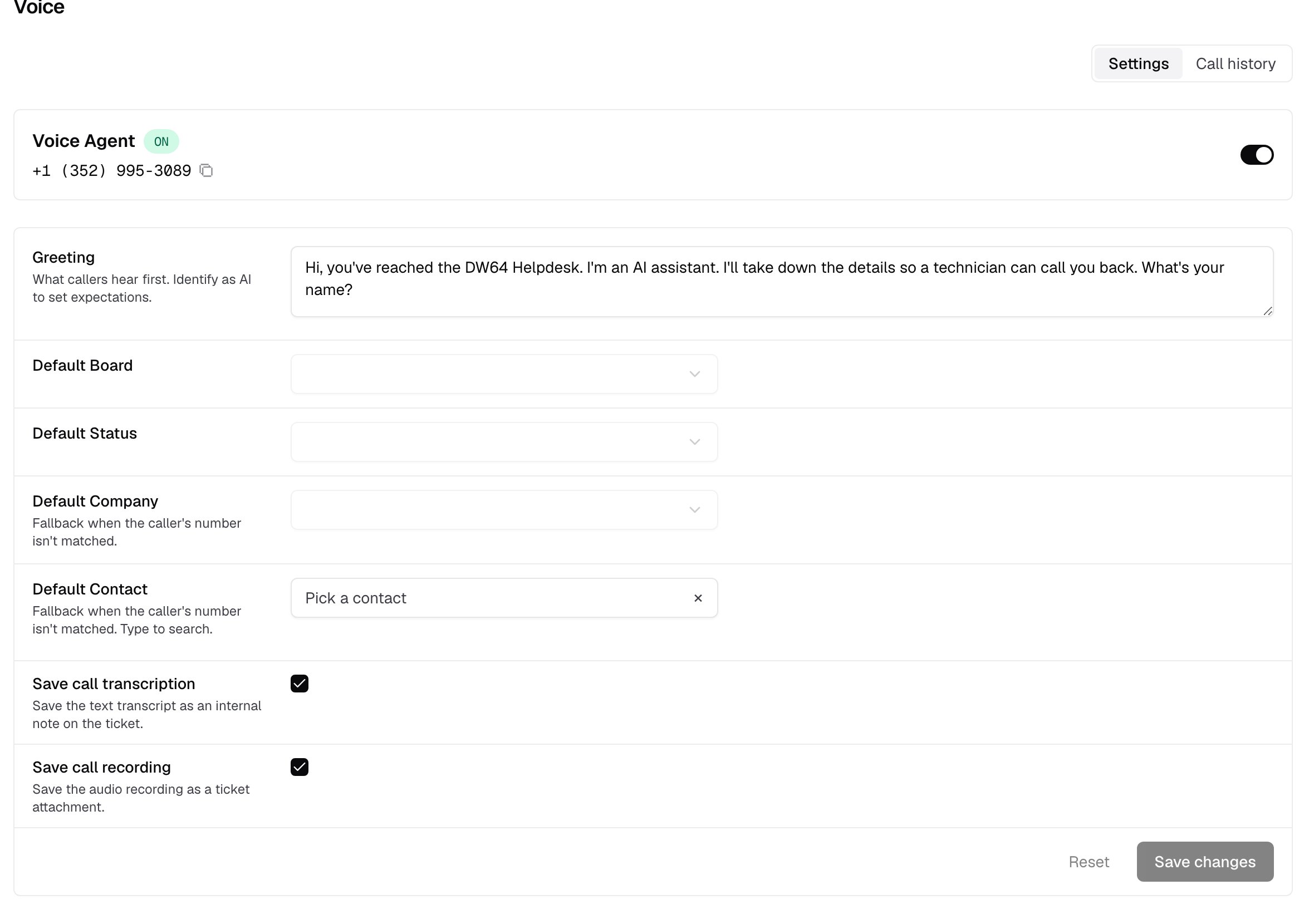
Defaults apply only when caller matching falls through. If the agent identifies the caller’s company and contact from the inbound number or the conversation, those values override the defaults on the resulting ticket.
How the caller gets matched to your PSA
The agent attaches each call to a client using three checks, in order:- Phone number. If the inbound caller ID matches a contact’s phone number in your PSA, the ticket is attached to that contact’s company.
- Company name. If the caller states their company and it exactly matches a company on file, the ticket goes there. Matches are exact on purpose, so tickets never land on the wrong client: a caller saying “Acme” won’t match “Acme Construction”.
- Name within company. Once the company is known, the agent tries to match the spoken caller name to a contact in that company.
Call history
The Call history sub-tab lists every call the voice agent has handled, including:- Caller — the matched contact name (or the raw caller ID if no match was made)
- Company — the matched company
- Started / duration — when the call came in and how long it lasted
- Urgency — how the agent classified the call (low, normal, high, urgent)
- Ticket — a link to the PSA ticket the call created, when one was created
Which PSA gets the ticket
The voice agent creates the ticket in the first PSA connected on your account, in this order: ConnectWise → HaloPSA → Autotask. If you have more than one PSA connected, the first in the list wins. Choosing a different one isn’t user-configurable yet. Very large MSPs see every board, status, and company in the dropdowns; contact lists are looked up on demand, so the form stays fast even when a client has thousands of contacts.Limitations
- One voice agent per MSP. All clients under that MSP share a single number and a single greeting.
- Single PSA per call. The agent creates the ticket in one PSA, the first connected of ConnectWise, HaloPSA, or Autotask.
- Exact company name match. Fuzzy matching is deliberately off to prevent cross-tenant ticket leakage.
- US-format phone numbers are formatted for display; other formats render as raw E.164.